Tag Archive: social media

The Only Content Map You’ll Ever Need | Content Strategy

Content Mapping, Content Strategy

One of the things I frequently do for clients is to create content for their website, for social media, for PR, or for other marketing pieces.

When I start a new project, I often hear statements like “we already have most of the content”, or “just write a few quick blog and social media posts and that’ll be our content”, or “our intern is handling the blog and social media”, or “our CEO wrote the copy for the homepage”. Aaargh.

The ROI on that type of “content marketing” is pretty darn low.

Real content creation and marketing needs an upfront strategy, in order to:

  • Ensure the content achieves business goals, like conversions or activation,
  • Keep it flowing and current,
  • Make certain it’s SEO-optimized, and
  • Meet customer needs.

I use a CONTENT MAP to develop a successful upfront content strategy. I map the content types to user emotion and intent. This way, the content follows a typical sales funnel to ensure it is set up to deliver the goals of the business.

Once the content map and strategy is complete, content creation and delivery flows efficiently and effectively.

content strategy, content map, content marketing templateI’m sharing my Content Strategy Map template for you to use for your next content marketing project or website design. I developed it based on lots years of learnings in digital marketing! You’ll find it captures most, if not all, of the kinds of content you’ll need. As you can see, its filled in with placeholder copy so you get the idea behind the different parts of the map.

Feel free to download the Content Strategy Map now (it’s in PDF form). I’m confident it will be the only content map you’ll ever need!

[Of course, if you want help with content creation for your website, blog, or social media, just fill out the form on the left to contact me, and I’ll be happy to get your content flowing!]

NOTE: I can’t claim to have invented the business of content strategy, and these smart marketers were great resources for this post: Kristina Halvorson’s Content Strategy for the Web, Kane Jamison of Content Harmony, and the folks over at Wordstream.

Continue Reading

Why Images Are So Important for Social Media Engagement

Why Images Are So Important for Social Media Engagement

You know the old saying, “a picture is worth a thousand words”? The other day, I wondered two things about it:

  1. Where did the saying came from? and,
  2. Is there real research behind it?

A little Google-ing got me the answer to the first. It turns out that its ‘introduction’ is attributed to Frederick R. Barnard, who published an article touting the effectiveness of graphics over just copy with the title “One Look is Worth a Thousand Words“, in the Dec. 8, 1921 edition of the advertising journal, Printer’s Ink.

Fred was clearly on to something.

I found the answer to the second question in scads of consumer market research, backed up by my own experience helping businesses get more results through social networking and blogging.

Here’s what the research says:

  • According to Kissmetrics, images on Facebook receive 53% more Likes, 104% more comments, and 84% more click-throughs on links. 53%! 104%! 84%! That made you sit up, huh?
  • In addition, the most recent Facebook redesign makes images even more important for newsfeed visibility.
  • Research from Buffer shows that using images on Twitter increases retweets by 150% and click-throughs by 18%.
  • PRNewswire found that images included in a press release expand the release’s audience up to 180%.
  • Brain research shows that almost half of our brain is involved in visual processing - and we can make sense of a visual in less than 1/10 of a second! Conversely, on average, we only read 28% of words on any given web page. Ouch.

I’ll say it again. Fred was clearly on to something.

Images used in your social media (and by definition, your blog content) are far more attention-grabbing than text or plain old links, more likely to be shared, evoke emotional reactions in viewers (and emotion SELLS), and can portray a lot of information quickly and more efficiently than text.

Google’s Abigail Posner explains why engaging with an image feels so compelling to us humans:

“When we see or create an image that enlivens us, we send it to others to give them a bit of energy and effervescence. Every gift holds the spirit of the gifter. Also, every image reminds us and others that we’re alive, happy and full of energy (even if we may not always feel that way). And when we ‘like’ or comment on a picture or video sent to us, we’re sending a gift of sorts back to the sender… this ‘gift’ of sharing contributes to an energy exchange that amplifies our own pleasure.”

Convinced? Good. Now, here are a few suggestions on how to execute:

  • Include at least one image in every blog post. Don’t skip this step.
  • I recommend sizing the image(s) to 1/2 the width of your blog post.
  • Make sure your images are high quality and relevant.
  • Edit images using visual design that attracts eyeballs, e.g., the right color, contrast, texture, shape, balance, proportion - here’s a good summary guide from Curalate.
  • Consider adding text to your images and photos - quotes are highly shareable.
  • Even better, use infographics.
  • Use images with personality!
  • If it’s right for your business, collect and post user-generated images.

As to sources for your images, you can 1) create your own - I’ll have more on this in an upcoming blog post - or 2) you can source them online:

  • Creative Commons Images (images that are legal to use in your marketing) – Try Flickr’s Advanced Search. Be sure to check the box to Only search within Creative Commons-licensed content and include a photo credit with images you use.
  • Royalty-Free Stock Photos – Try stock photo sites like Stock.xchng or iStockphoto that have a fair amount of free or low-cost stock imagery to license.

Lastly, to optimize your images for the various social media platforms, try the Social Image Resizing Tool, which has preset image sizing (!) for all the primary social media sites.

And remember Fred. Even back in 1921, he was on to something.

Continue Reading

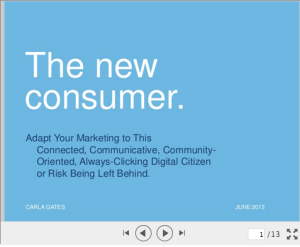
The New Consumer: Adapt Your Marketing to this Connected, Communicative, Community-Oriented, Always-Clicking Digital Citizen, or Risk Being Left Behind

The new consumer — sometimes called “Generation C” — is:

  • Connected
  • Communicative
  • Content-Centric
  • Computerized
  • Community-oriented
  • Always clicking
  • In control

The New Connected Consumer

Today’s consumers have fundamentally changed their relationship with media and technology…and with brands. They don’t want to be talked at, instead they want to be invited to the discussion. And their online behavior has less to do with the year they were born and more to do with their attitide and mindset.

So, what does the new consumer want? And what should you as a marketer do about it? Find out in my latest presentation.

Continue Reading

Delete or Respond? The Customer Experience on Your Social Media Pages

When you see that a prospect or customer has posted on your social media page, is your first instinct to delete the comment or question, thinking one of these thoughts as you do?

  • “I’m too busy to answer this.”
  • “If they really want to contact us, they’ll call or email us.”
  • “I don’t want other followers to see this (possibly negative) comment so I’ll just get rid of it and pretend it never happened.”

As my kids would say when they were toddlers, “That’s very, very bad”.

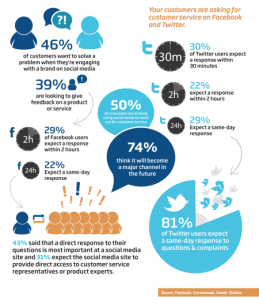
Social Customer Service Infographic, via ConversocialAs this very enlightening infographic from Conversocial explains, “50% of consumers are actively using social media to reach out for customer service”. Would you hang up the phone on half of all the calls that come in to your business, or delete half of your customers’ emails?

It’s surprsing to me how many actually do, unfortunately. I’ve reached out to small businesses and large brands via Twitter and Facebook many times, and had my comments or questions deleted or ignored. It makes me not want to do business with the company anymore. It took my comment being retweeted several times before one large consumer-facing software company responded to a customer service issue I recently had. By that time, thousands of people on Twitter had seen my comment, and the company had lost me permanently as a customer.

Ok, so how do you prevent all this customer angst? It’s not that hard, really. If you set up a social media page for your company, you’ve got to remember its a 2-way street, and watch that page like a hawk for customers interacting with you. And when they do, interact back. Social media’s now just another channel, like email, the phone, or your website. Look at that infographic again. It’s 50% now, but expect that to go up in the future.

Here are a few simple rules to help with your social engagement:

  • Monitor your social media pages regularly (the smart big brands do this 24/7, often with a large staff of monitors; small businesses must find time to do this every day - use a social platform like SproutSocial or Hootsuite if you need to).
  • Respond quickly; ideally within 24 hours. What I do with the pages I manage is to acknowledge the comment right away and let them know I’m looking into their issue.
  • Use a consistent, polite and friendly tone. Pretend you’re on the phone with the customer as you write. And make sure that all the admins on your page use the same tone of voice. I recommend coming up with a set of standard responses to use in multiple situations that you can customize when necessary.
  • Thank all commenters publicly for their feedback, regardless of the subject of the comment or question; after all, they made the effort to follow your page. In addition, your response will be seen by all your other followers, giving you an opportunity to highlight your great customer service. Even if you ultimately need to private message the commenter in order to resolve the issue, at least you’ve shown all your followers that there are real people behind the brand.
  • Keep track of all questions and comments and note any patterns; social media is a great source of market research for your business.
  • Only delete the true ‘trolls’ - those that use offensive or abusive language. You still might need to deal with them via a private channel, but their statements won’t offend your other customers.

What are your experiences with social customer service? Some companies have come up with resourceful ways of handling this issue, and its always good to observe how they do it.

[Thanks to Conversocial for doing the research on this issue!]

Continue Reading

5 Tips to Bring New Life to Your Social Profiles

disney_socialprofiles

If you’re reading this, you or your business most likely have profiles across multiple social media platforms like Twitter, YouTube, Facebook, Google+, or Instagram. Here are two examples of what I mean by “social profiles”: Disney’s Twitter and Facebook profiles.

Social profiles introduce your personal or business brand to the digital citizens on social media, and include items like images, taglines, bios, logos, company descriptions, and profile photos. If you want to maximize the number of followers on your social media platforms, like Walt Disney World has done, start with these 5 tips to sharpen your social media profiles:

  1. State your personal or brand value proposition in your bio. Don’t leave people guessing at what you’re all about. You’ve got about 6 seconds to convince prospects to engage with you. Your bio should tell them exactly what your company does and what benefits you deliver. Note how Disney explains that the benefits of joining their Facebook community are to “Learn about park updates, news, and special backstage info here.”
  2. Develop consistent visual and written branding across all platforms. Each social media platform has different requirements for text length and photo size in the profile area, but even within those differences, you can still use similar, branded language, color, and imagery. This is important to enhance the credibility and authority of your brand. Notice how Disney uses their iconic fireworks imagery on both Twitter and Facebook profiles.
  3. Use big, compelling visuals. The visual richness available on social media platforms has increased dramatically—from the Facebook cover photos, to the massive hero image on Google+, to the upcoming new twitter profile pages. Learn the visual specs of each platform, and fill those specs with brand-consistent, big, compelling, images.
  4. Don’t forget SEO. Many of the search engines use social media bios in their search algorithms. Craft your bio to leverage your most important keywords while still offering prospects a compelling reason to engage with you.
  5. Include links. Adding links to your social media profile gives you the opportunity to direct traffic to a website or landing page with more targeted messaging. It’s amazing to me how many businesses forget to add links to their blog, or other social media profiles, in this space. If you remember to do this, you’ll stand out from the pack.

Once you’ve optimized your social profiles, review them every quarter to ensure they stay in line with your current value proposition.

What about you? Have any more tips for great social profiles?

Continue Reading